HD File Manager & Commander1.1.4
Continue to app
Free Version
Publisher Description
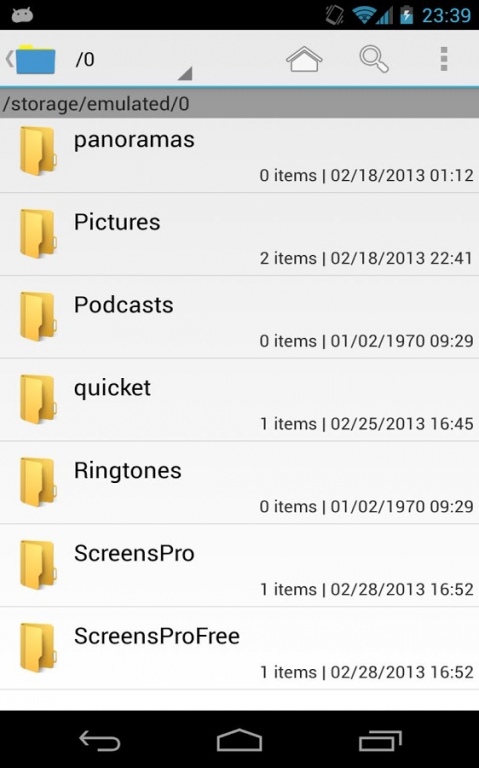
File Manager has been developed to be the most user-friendly file management tool (file manager, file explorer, filer) in Android file managers.This application has basic file management function as a filer.
In addition to basic file operations, the following operations are possible.
- Display by List/Grid
- Resizing thumbnail image.
- Dual screen
- File sort
- File search
- Multi select (Range select support)
- Zip (Multi encode support)
- Unzip file (Multi encode support)
- Favorite mark
- Desktop shortcut
- File share
- Layout arrange
- File attachment
- Image viewer
- Sending reduced image file
- Trash box
About HD File Manager & Commander
HD File Manager & Commander is a free app for Android published in the System Maintenance list of apps, part of System Utilities.
The company that develops HD File Manager & Commander is BooKPia. The latest version released by its developer is 1.1.4. This app was rated by 1 users of our site and has an average rating of 3.0.
To install HD File Manager & Commander on your Android device, just click the green Continue To App button above to start the installation process. The app is listed on our website since 2014-10-08 and was downloaded 21 times. We have already checked if the download link is safe, however for your own protection we recommend that you scan the downloaded app with your antivirus. Your antivirus may detect the HD File Manager & Commander as malware as malware if the download link to com.gasunbun.filemanager is broken.
The company that develops HD File Manager & Commander is BooKPia. The latest version released by its developer is 1.1.4. This app was rated by 1 users of our site and has an average rating of 3.0.
To install HD File Manager & Commander on your Android device, just click the green Continue To App button above to start the installation process. The app is listed on our website since 2014-10-08 and was downloaded 21 times. We have already checked if the download link is safe, however for your own protection we recommend that you scan the downloaded app with your antivirus. Your antivirus may detect the HD File Manager & Commander as malware as malware if the download link to com.gasunbun.filemanager is broken.
How to install HD File Manager & Commander on your Android device:
- Click on the Continue To App button on our website. This will redirect you to Google Play.
- Once the HD File Manager & Commander is shown in the Google Play listing of your Android device, you can start its download and installation. Tap on the Install button located below the search bar and to the right of the app icon.
- A pop-up window with the permissions required by HD File Manager & Commander will be shown. Click on Accept to continue the process.
- HD File Manager & Commander will be downloaded onto your device, displaying a progress. Once the download completes, the installation will start and you'll get a notification after the installation is finished.
Program Details
System requirements
Operating systems
Android
Download information
File size
N/A
Total downloads
21
Pricing
License model
Free
Price
Version History
Here you can find the changelog of HD File Manager & Commander since it was posted on our website on 2013-08-22. The latest version is 1.1.4 and it was updated on Soft112 on 07 October, 2026. See below the changes in each version:
version 1.1.4
posted on 2014-10-08
1.1.0 Bug Fix,1.0.3 Bug Fix,1.0.2 Bug Fix, Google Play Service
version 1.0
posted on 2013-03-21
Several fixes and updates
